Roles
OpenTalk provides several roles, which are explained here.
Moderator
The creator of a meeting automatically becomes its moderator. Moderators have access to additional functions that are not available to other participants.
Some of these functions include:
- Muting all participants
- Admitting participants from the waiting room
- Starting a coffee break
- Creating meeting minutes
Co-Moderator
A moderator can invite additional registered users as co-moderators. Co-moderators have the same functions as the main moderator.
This is useful when the main moderator cannot attend but moderator functions are still required during the meeting.
Participants with moderator permissions have access to the left-hand toolbar and an extended three-dot menu.
Info
If you do not see any moderator functions, check whether you are using the correct link. If the URL contains ?invite, you will not be recognized as a moderator.
User
Users are participants who have an account in the same context as the moderator, such as subaccounts. Users must sign in so that the system can recognize them as registered users.
Only signed-in users and moderators may participate in polls.
Guest
Guests have limited functionality but can participate in meetings without having an OpenTalk account.
Display
The participant’s role is shown in the Participants tab.
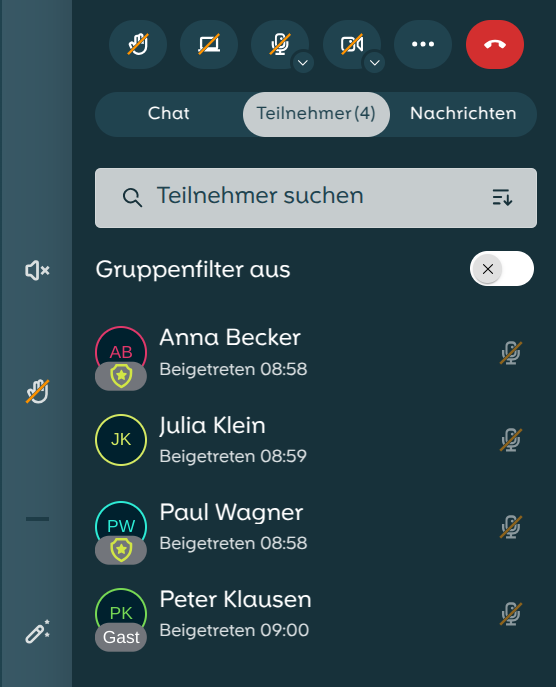
Moderators have a shield with a star below their name, such as Anna Becker and Paul Wagner. Users have no additional label, such as Julia Klein.
Guests have the label "Guest" below their name, such as Peter Klausen.